
Lesson 3 of 6
OpAmps
Use opamps as voltage buffers and inverting amplifiers, fix our oscilloscope probe and add gain & distortion.
Opamps are extremely useful in audio electronics. It's very hard to build an analog circuit without one. Very early designs used transistors instead of opamps because opamps were very expensive back then, but now they cost almost the same.
💡 Still, it's very hard to implement voltage-controlled oscillators without transistors in pure analog circuitry.
In Bread Modular, we don't have analog VCOs because transistors are hard to work with: their behavior changes with temperature and humidity. So, we would need to focus a lot on tuning & that's not fun.
Opamps can be used in multiple modes (or configurations). Here we discuss the buffer and inverting amplifier modes.
💡 There are many types of opamps with different characteristics. In our case, we work with 0-3.3V, so we need an opamp that can work with the full voltage range (which is not true for most opamps).
These are known as rail-to-rail opamps (usually a bit more expensive than other opamps). We use the MCP6002, which is affordable & decent for audio.
If you work with 12V or 9V, you can use the TL072 opamp, which is very affordable and very high quality for audio applications.
🚨 Be careful when sourcing opamps from AliExpress and local shops. They might be fakes and you won't get the desired result.
So, if possible, get them from a reputable source like DigiKey, Mouser or LCSC (China).
There are also Chinese makes of popular opamps (which use the same designs). They are clones, but not fakes. If the manufacturer is well known, they are almost the same as the original.
1. OpAmp as a Voltage Buffer
This is a very useful mode of the opamp. It looks like this:
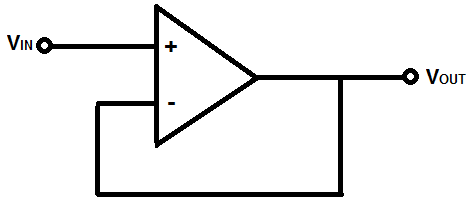
💡 In this mode, Vin is the same as Vout. But it has some very interesting characteristics:
- Input impedance is 10M ohms or higher.
- Output impedance is 0 ohms.
If you look carefully, with buffers we can now fix the two problems we encountered in the previous lesson.
Before we fix them, let's learn more about the pins:
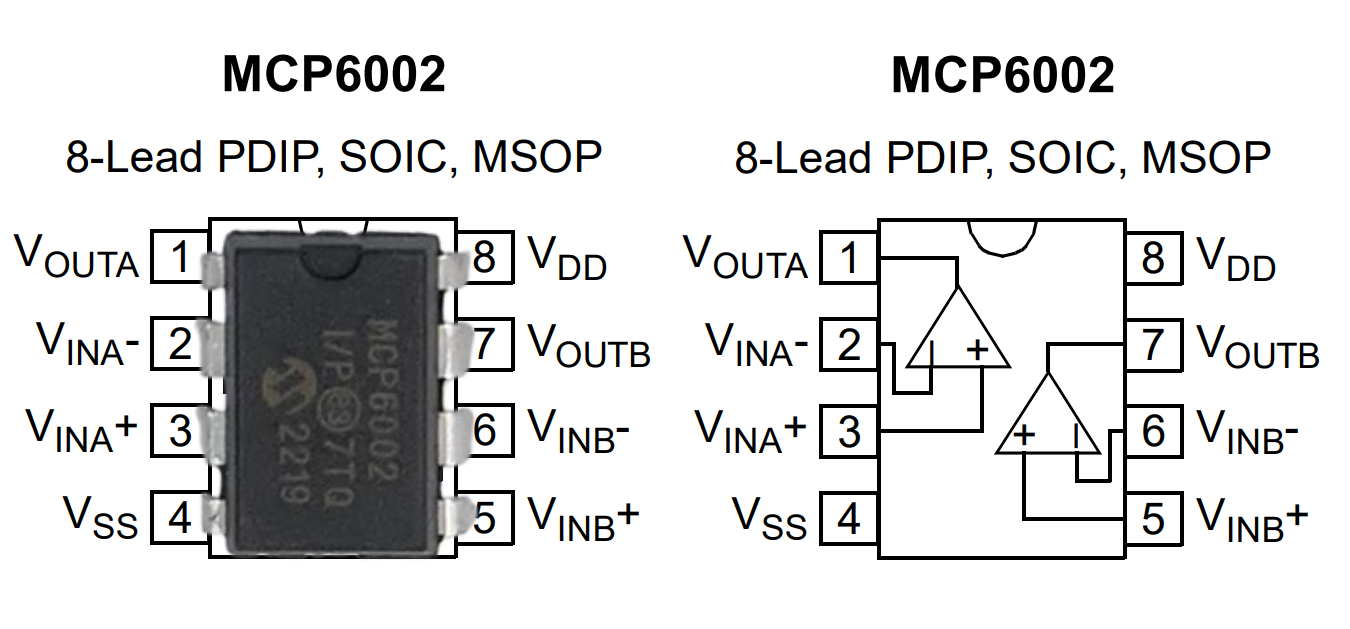
This is what the MCP6002 opamp looks like and its pinout:
- This chip houses two opamps.
- VDD (8) is the positive voltage input (3.3V).
- VSS (4) is the negative voltage input (for now, let's use 0V).
- A single opamp has three pins:
- Vout (output)
- Vin+
- Vin-
Don't worry too much about how each of these pins works. We can simply use them. Later on, if needed, you can research how they actually work.
Bread Modular OpAmp Breakout
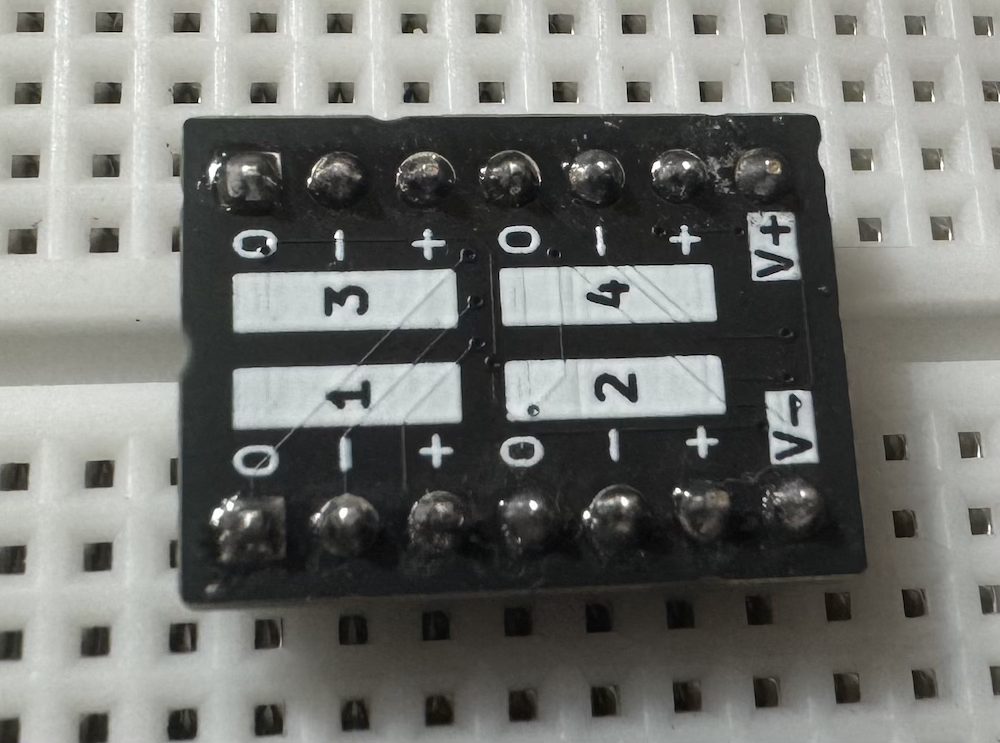
Our kit has an opamp breakout which houses 4 opamps. It uses MCP6002 chips, but the smaller SMD version.
- We need to give 3.3V to V+
- And 0V to V-
- 1, 2, 3 and 4 mark the individual opamp pins.
This is how we wire it as a buffer:
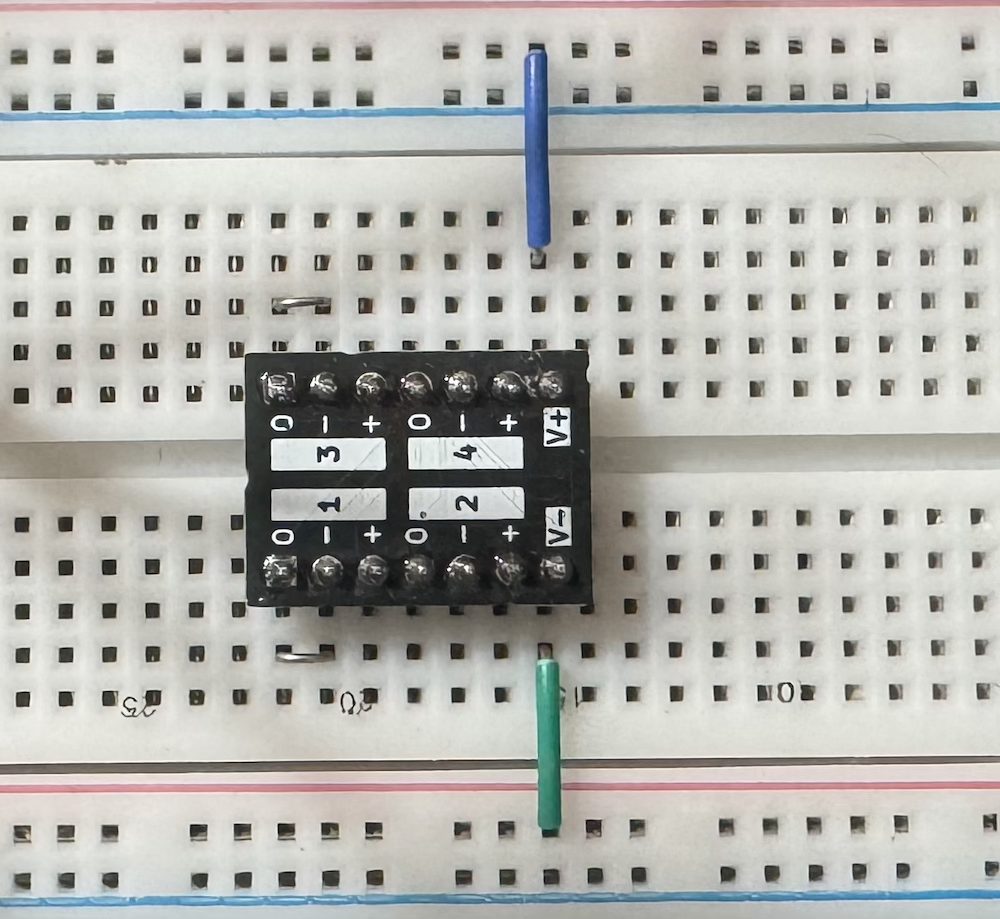
Send the voltage input to the + pin and take the output from the output pin.
2. Buffer Uses: Fixing our Oscilloscope Probe
This is one of the main uses of a buffer. Since it has 10M or higher input impedance, we can feed it from any source. Its output impedance is 0 ohms, so it will never get loaded by the 100k impedance of the 16bit A1.
So, now we can put it in front of our 16bit A1 probe.
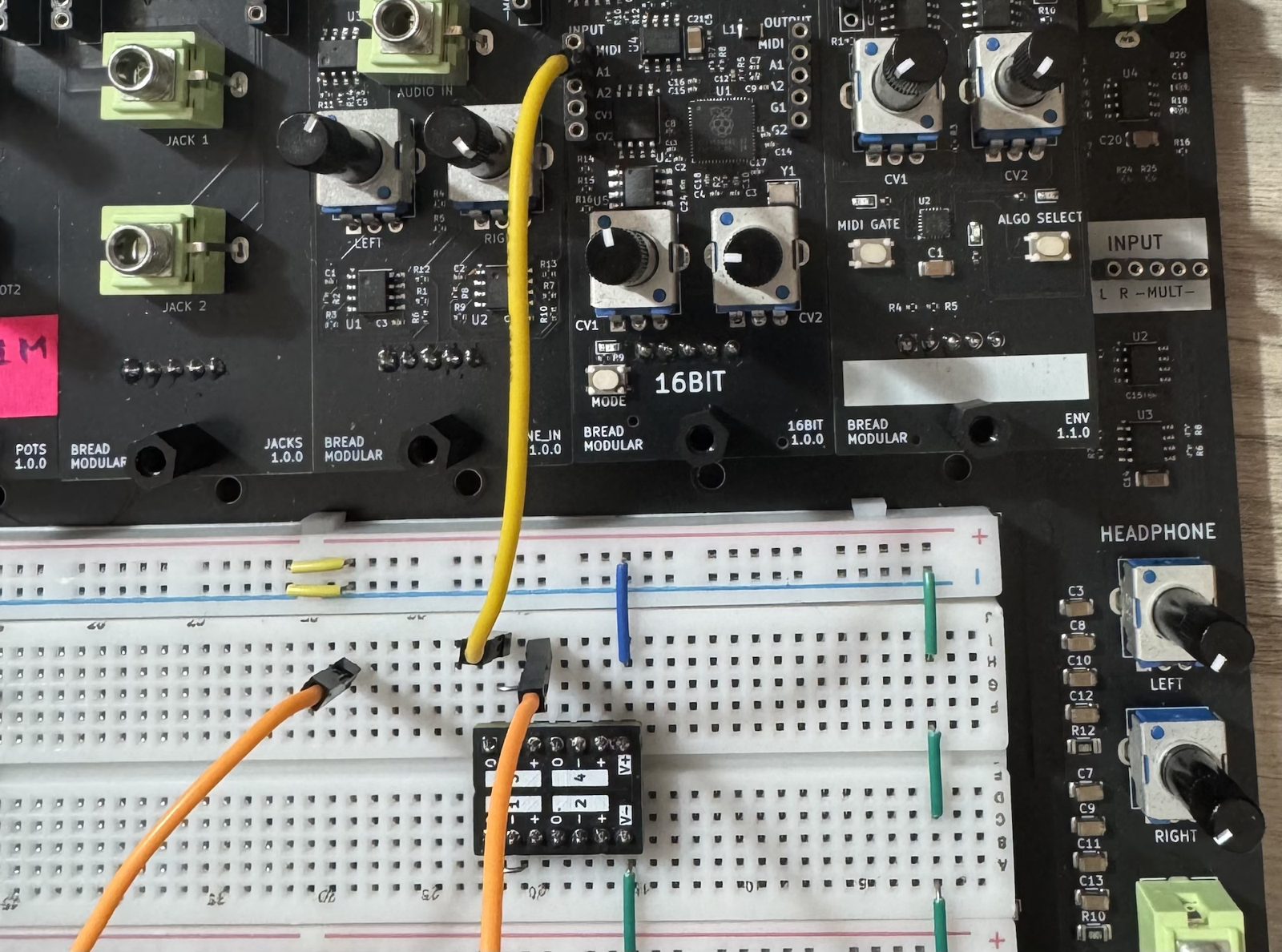
Here's how this works now:
- The orange wire is connected to the "+" pin of the opamp, which is the input. So, that's our new oscilloscope probe (which has 10M or higher impedance).
- Then the "o" pin is connected to the 16bit A1.
Now try checking the potentiometer with the 1k voltage divider again.
Here are some other use cases of a buffer:
Changing the output impedance of a circuit
For example, for any voltage divider. The buffer's output impedance is 0 ohms, so you can add a resistor of your choice in series with the output and that becomes the new output impedance.
Changing the current of a given output
Let's say you want to drive an LED from an LFO, and the output impedance of this LFO is 10k. Then there's not enough current to drive an LED (as we increase the impedance, the current goes down).
So, we can buffer it with an opamp and send it to the LED. You still need to send it through a proper resistor like 1k (or even 330 ohms). Otherwise, the LED will try to draw the maximum current from the opamp (which is 20mA for the MCP6002) and that's the end of that LED.
3. Inverting Amplifier (Theory)
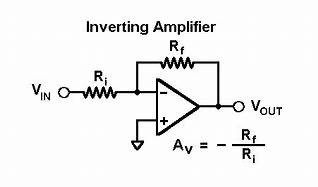
This is another useful mode of the opamp. Using this mode, we can amplify a given input voltage. We can either reduce it or increase it. Again, it comes with a few characteristics:
- Vout has 0 ohms impedance.
- Vout has a 180-degree phase shift compared to Vin.
- Vin has an input impedance of Ri.
- The gain is Rf/Ri (the minus "-" sign in the above diagram indicates the phase shift).
- The + input needs a virtual ground (in our case, it's 1.65V).
💡 We usually power an opamp with positive and negative voltages. That's why Eurorack has +12V and -12V.
Then 0V is the ground, and the waveform wiggles around 0V.But in our case, the positive voltage is +3.3V and the negative voltage is 0V.
The ground for the opamp is 1.65V. That's where our waveform wiggles.Technically, 0V is our ground as well. There's no negative voltage in our setup. That's why we call 1.65V the virtual ground.
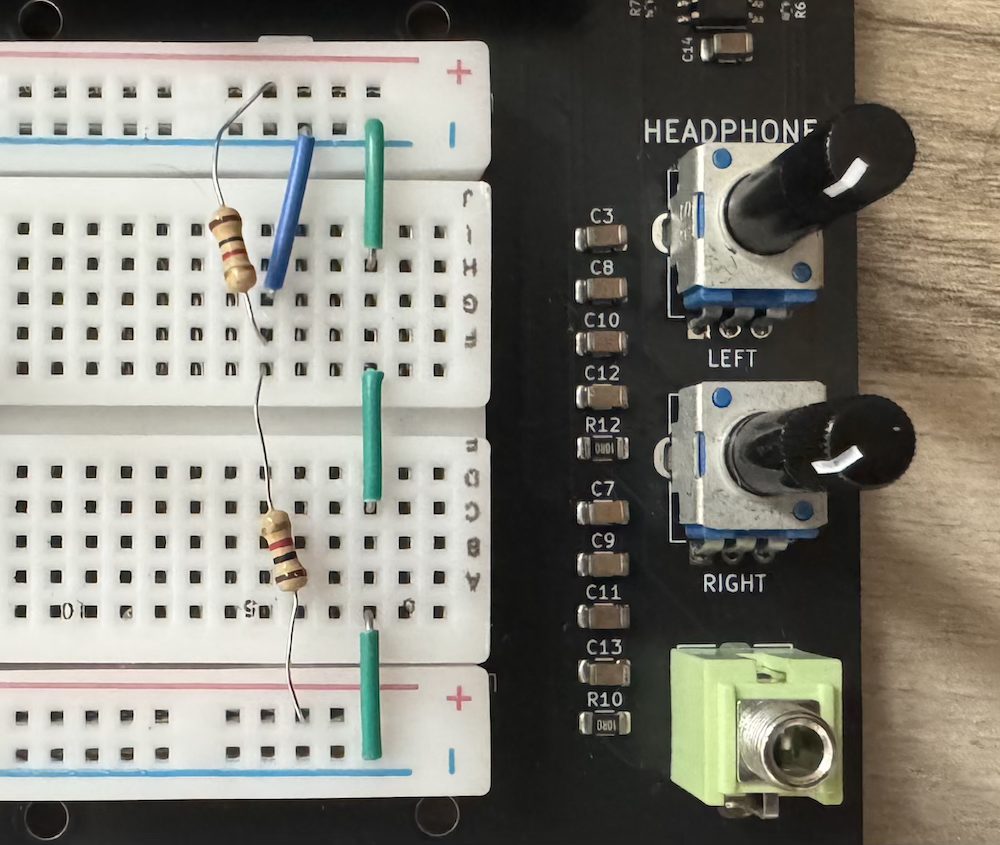
Setting up a Virtual Ground Rail
Virtual ground is very important and used in many places, so it's a good idea to assign it to a power rail. In our setup, we use the top and bottom "-" rails for that.
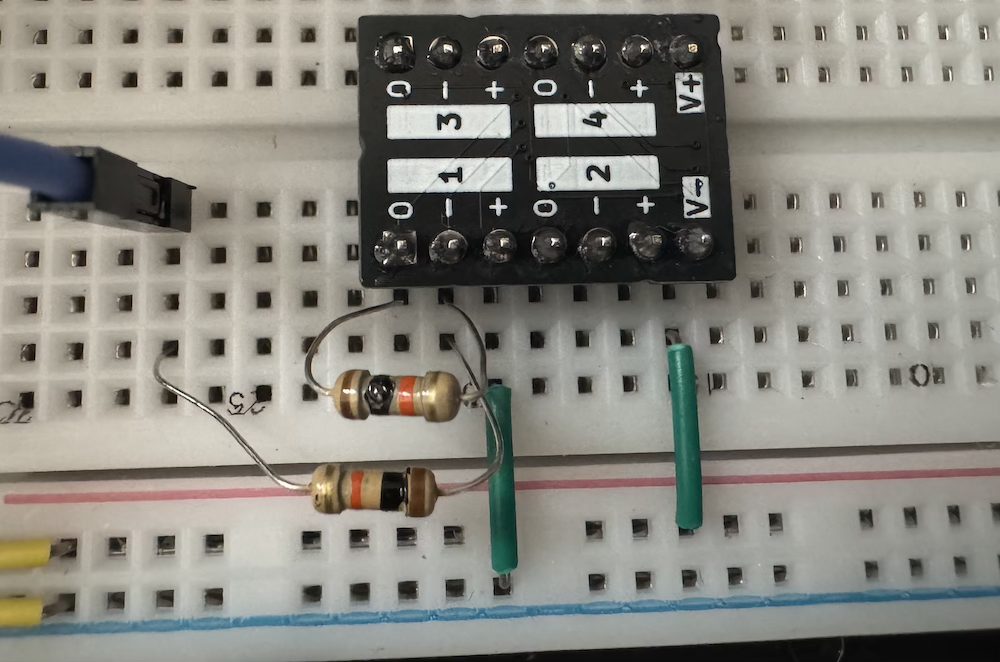
4. Unity Gain Amp
Let's set up both Rf and Ri using 10k resistors. The gain should be one.
This is the input and output inspected with the oscilloscope:
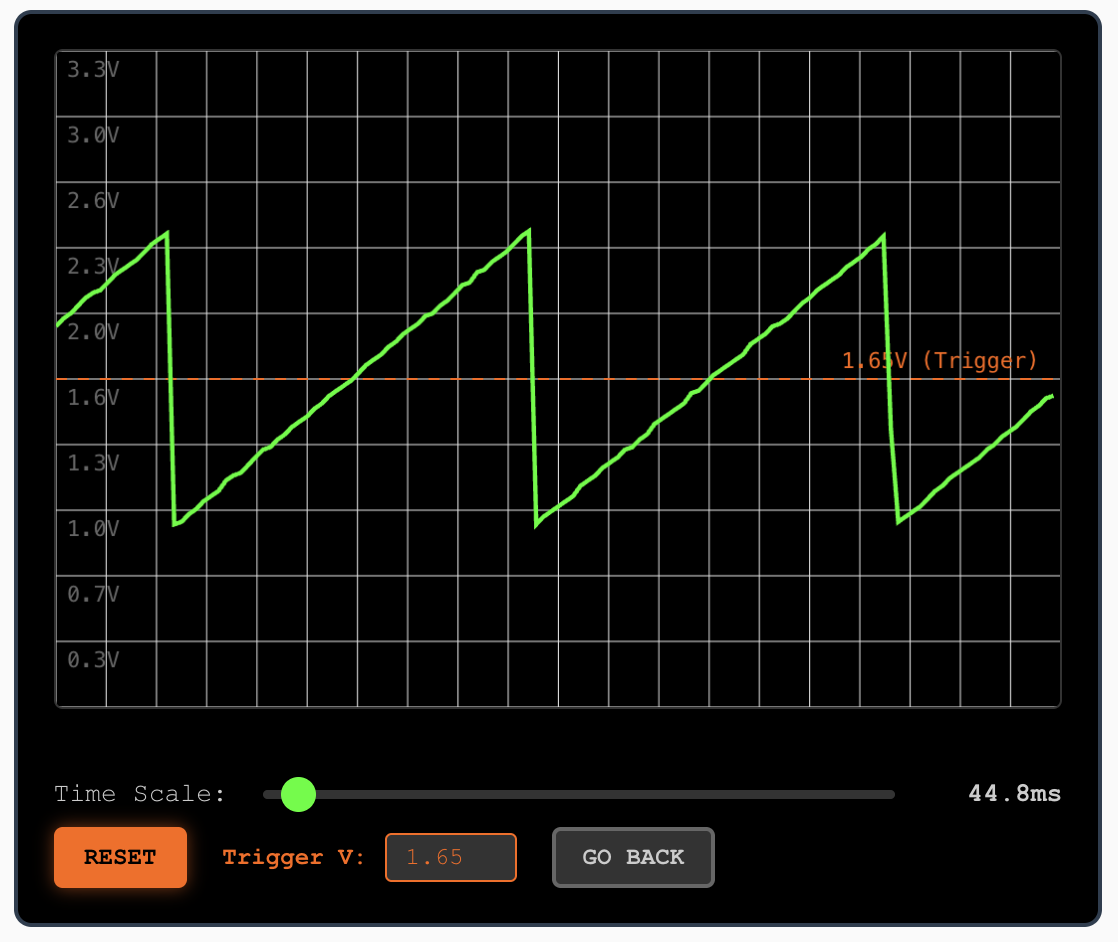
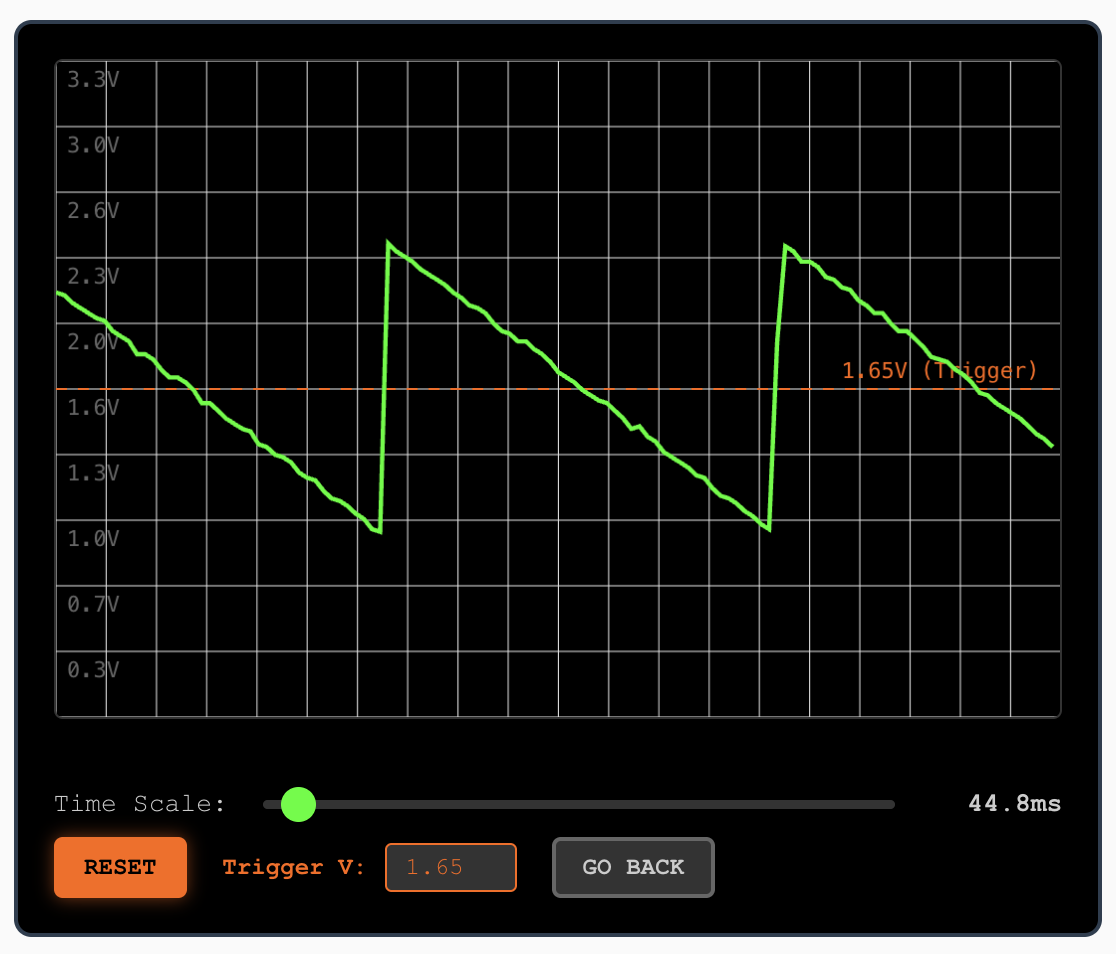
💡 There's no audible difference in sound with a 180-degree phase shift. But make sure not to mix the input and output together. Then you will get phase cancellation.
Here are some experiments you can do:
- Put a 1M resistor in front of (in series with) Ri. Now the total input resistance is (1M + 10k). Try calculating the gain.
- Now, instead of the 1M resistor, use the 1M potentiometer. Use pins 1 and 2 of the pot (then it acts as a variable resistor instead of a voltage divider).
5. True Gain Amp
Now let's implement some real gain. It's very simple. There are a couple of ways to do it. Here's one:
- Use Rf = 1M
- Use Ri = 100k
Here we get 10X gain and the result looks like this:
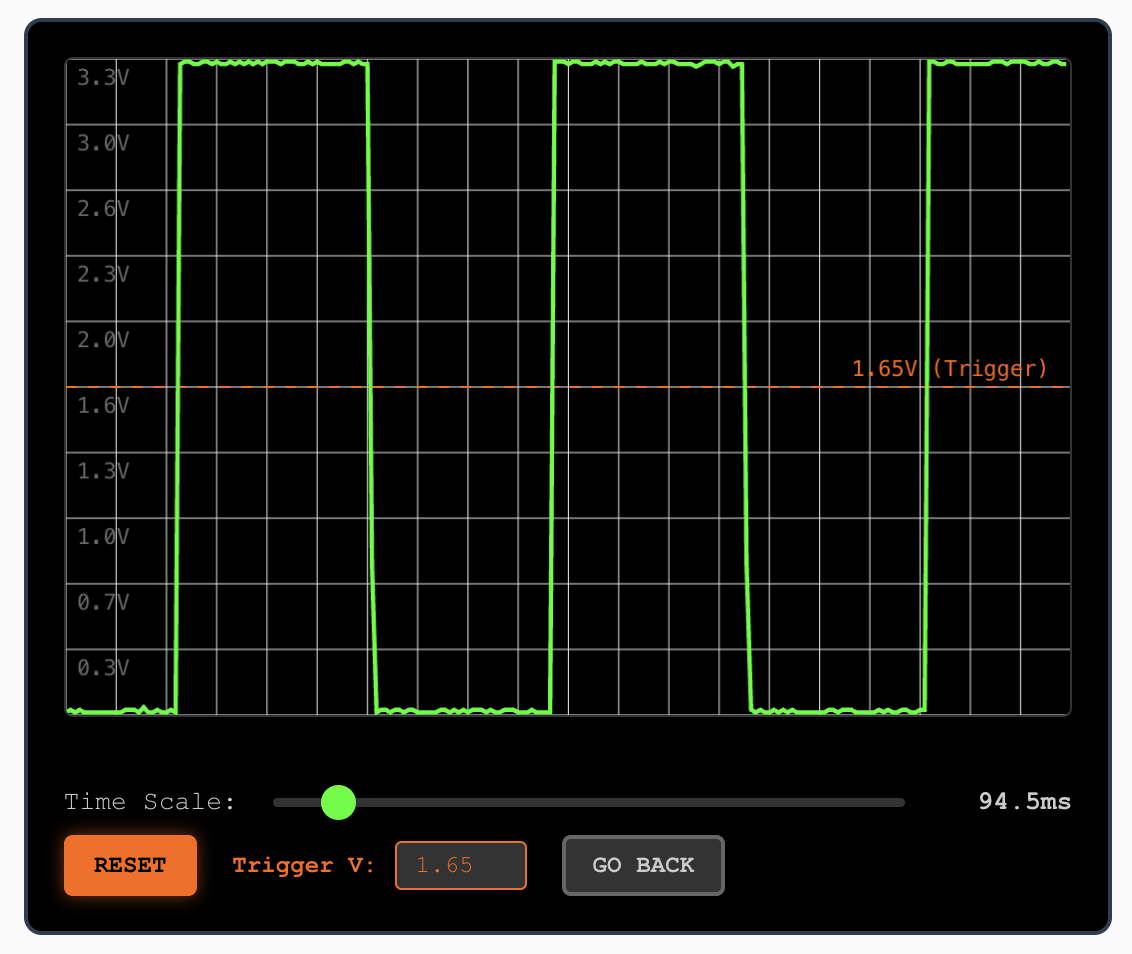
Here we can see opamp distortion. An opamp can't go beyond its operating voltage range. Anything beyond that is clipped to the max or min. That's where the distortion comes into play.
👂 Try listening to the audio while looking at the scope. You will get a feel for how these sound.
Here are some interesting experiments:
- Use Ri = 10k for 100X gain.
- Use a 1M potentiometer in series with Ri to control the gain.
- Feed the A2 (super-saw) output.
- Feed some real music through the line input & the provided aux cable (probably from your computer's output).